I remember asking myself this exact same question not too long ago: Can I really enhance video quality online for free? I had a bunch of old videos sitting on my phone—family dinners, random vlogs I filmed during college, even some recordings I wanted to share on social media—but every time I watched them back, the quality made me wince. They were either too dark, super low resolution, or just blurry in a way that felt unfixable. For a while, I thought the only option would be to either buy expensive editing software or just accept that those clips were a lost cause.

One day, I started searching around for online options and came across AI-based tools that promised to clean up and enhance video without needing downloads or complex setups. Honestly, I was skeptical. I had tried “enhancement” apps before that just stretched the pixels and made everything look worse. But AI tools are a little different. Instead of guessing, they’re trained to recognize faces, textures, colors, and lighting, and then rebuild those details in a smarter way. That means instead of just stretching a blurry face, the tool can actually sharpen it and make it look like it was shot in higher quality from the start.
The tool that worked best for me was HitPaw Online AI Video Enhancer. The first thing I noticed was that it was browser-based, so I didn’t have to download anything heavy or sign up for complicated accounts. I just dragged my video into the interface, and within seconds, it showed me a preview. That was already a step above most free tools I had tried in the past.
The options were also surprisingly flexible. There are different AI models built for different problems—like a Face Model for restoring details in people’s faces, a Denoise Model for clips that have too much grain, a Low Light Model for videos shot in dark rooms, and even a Colorize Model that adds natural colors to black-and-white footage.
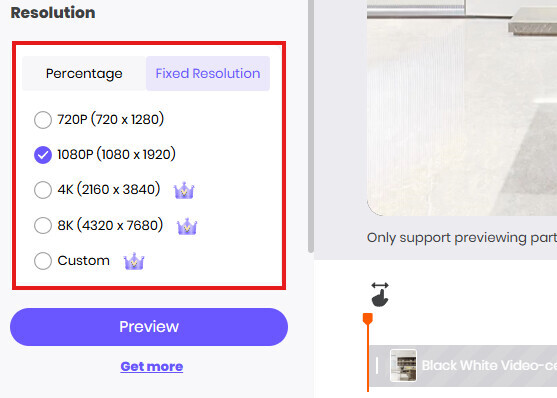
What impressed me was how easy it was to scale up the resolution. I could take a simple 720p clip and scale it all the way to 4K or even 8K, depending on what I wanted. Of course, the results weren’t the same as if I had filmed it natively in 8K, but the difference was dramatic enough that the video went from “don’t post this” to “wow, that actually looks great.” The colors were brighter, the faces were clearer, and the overall sharpness made it look like it had been filmed on a newer phone.
The best part was that I didn’t have to pay to test it out. The online version gives you access for free, and while there are premium features for people who want even more control, I got what I needed without spending a dime. For me, that answered the big question—yes, you really can enhance video quality online for free, and the results can be good enough to share confidently with friends, family, or even followers online.
Of course, there are some limits. If your video is completely out of focus or filmed in pitch darkness, no amount of AI can magically turn it into a professional movie. But for everyday situations—like dim lighting at a party, old clips from your phone, or slightly grainy travel footage—these tools work far better than I expected. I’ve since used them to clean up videos for personal projects and even a presentation at school, and it saved me so much time compared to trying to learn complicated editing programs.

So if you’re wondering whether enhancing video quality online for free is possible, my answer is absolutely yes. It won’t fix everything, but for most clips, the improvement is huge.
And the fact that you can do it in just a few minutes without needing advanced skills makes it even better. If you’ve got videos you’ve been hiding because of their quality, it’s worth giving one of these AI enhancers a try—you might be surprised at how much life they still have in them.