If you’re looking for an AI photo enhancer to upscale low-resolution images, remove noise, or restore blurry photos, Aiarty Image Enhancer is one of the tools worth considering. In our latest review, we take an in-depth look at its features, pricing, real-world performance, and whether it delivers professional-quality results.
What Is Aiarty Image Enhancer?
Aiarty Image Enhancer is an AI-powered photo enhancement software that offers three AI models for image upscaling, denoising, and photo restoration. It can improve image resolution, reduce blur, restore details, and even colorize old black-and-white photos. The software also includes a 2-Pass processing feature and supports both Windows and Mac.

Key Features
Our review covers several core features, including:
- AI image upscaling and resolution enhancement to 4K/8K
- Blur and noise reduction
- Multiple powerful AI enhancement models
- Batch image processing
- Multiple image format support
- Fast processing performance
- Windows and macOS compatibility
Pros & Cons
Aiarty Image Enhancer offers high-quality AI upscaling, offline processing, and batch enhancement capabilities. However, it also has some limitations, including limited manual controls, occasional over-processing on faces, and the lack of cloud collaboration features.
Pricing & Plans
Free or Trial Plan: It offers a 10-day trial including basic enhancement features with restrictions on export quantity and watermarked output images.
Premium / Pro Plan:
Annual License - $85 (discounted to $75 at the time of writing).
Lifetime License - $155 (discounted to $99 at the time of writing, includes lifetime updates).
How to Use Aiarty Image Enhancer
The article also includes a step-by-step tutorial covering image import, AI model selection, image preview, and exporting enhanced results, making it easy for beginners to get started.
Step 1: Download and install Aiarty Image Enhancer on your Mac or Windows computer from the official site.

Step 2: After importing, the software automatically detects and enhances the images.

Step 3: Preview the results and adjust settings such as the upscaling factor, AI model, and GPU or CPU acceleration if needed.

Best Alternative to Aiarty Image Enhancer: HitPaw FotorPea
For users looking for more AI models and greater flexibility, we also introduce HitPaw FotorPea as an alternative. With multiple AI enhancement models, old photo restoration, denoise tools, colorization, low-light enhancement, and batch processing support, it provides a more comprehensive image enhancement workflow.
With its stunning 10 AI models and highly efficient user interface, HitPaw FotorPea makes it easy to edit the various parameters of images. Whether you need to add colors to old images or increase their resolution, HitPaw FotorPea won’t disappoint you.
Features
- Brings in the 10 outstanding AI models to choose from
- Offers a simple user interface that allows you to fix blurred images quickly
- Allows you to put the light into the low-light images
- Create stunning artworks with AI-transform ordinary images into exceptional visuals in just a few clicks.
Here’s how to upscale image quality with HitPaw FotorPea
Step 1: Download and install HitPaw FotorPea on your computer.

Step 2: Once the image is imported, HitPaw FotorPea automatically displays its available AI models.

Step 3: In this phase, you’ll need to review the credentials of the images by hitting the Preview icon.
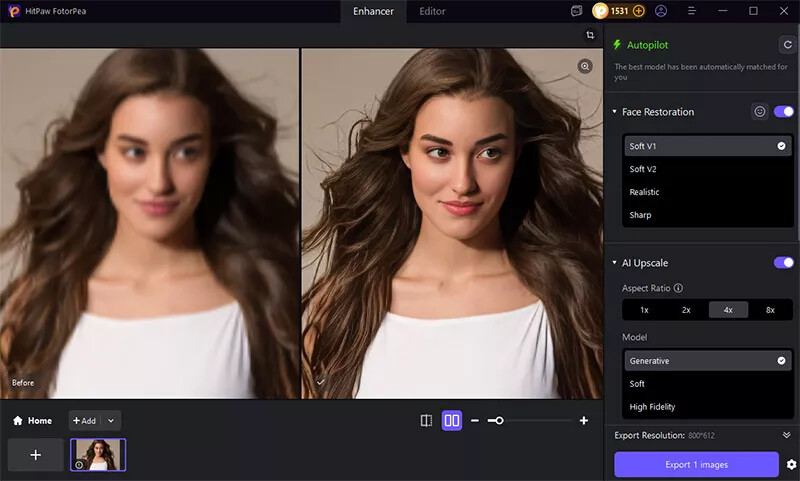
Aiarty Image Enhancer vs HitPaw FotorPea on Real Test

In the test, facial and fine-detail recovery was evaluated using portrait images with visible blur. When it comes to face enhancement, Aiarty tends to enhance the overall image and brighten lighting, resulting in a more vivid appearance.
In contrast, HitPaw FotorPea focuses on preserving the original texture and color tones, applying one-click AI enhancement while avoiding over-rendering for a more natural look.
Which one is better?
Final Words: How to Choose Aiarty Image Enhancer & HitPaw FotorPea
Aiarty Image Enhancer is a solid choice for users who primarily need AI-powered image upscaling, noise reduction, and photo restoration with a simple workflow. If your goal is to improve image quality quickly and efficiently without dealing with complex editing tools, Aiarty Image Enhancer can meet your needs.
However, if you’re looking for a more comprehensive AI photo enhancement solution with multiple AI models, advanced restoration features, colorization of old photos, low-light enhancement, face enhancement, and greater flexibility across different image types, HitPaw FotorPea may be the better option. Ultimately, the right choice depends on your specific editing needs and the level of control you want over the enhancement process.
 Read the full review: